


If you only look at the starting price tags in a Gumloop vs. Make comparison, the verdict looks obvious. Make’s Core plan starts at $9 a month ($10.59 billed monthly), while Gumloop’s Solo plan costs $30 to $37 a month. On paper, Make looks four times cheaper.
Then you try to build an AI workflow that scrapes a prospect’s website, enriches their company email, and writes a research brief.
In Make, that “$9 plan” suddenly requires you to open three more browser tabs, pull out your credit card, and sign up for separate paid API accounts for OpenAI, a web scraper like Firecrawl or Apify, and a lead database like Apollo. In Gumloop, those exact premium tools are already baked into your monthly credits—no external API keys required.
After publishing our detailed unit-cost pricing breakdown for Zapier, Make, and n8n, readers asked how AI-native builders fit into our stack of the Best AI Tools for Small Business in 2026: 15 Tools That Actually Save Time. Here is the real breakdown of Gumloop pricing vs. Make, how Gumloop credits vs. Make operations actually work under the hood, and which platform wins depending on what you are automating.
The Core Architectural Difference: App Glue vs. AI-Native Canvas
Make and Gumloop both give you a visual drag-and-drop canvas, so it is easy to assume they are direct clones. They aren’t. They were built for two completely different jobs.
Make (formerly Integromat) is “App Glue” with AI bolted on. Make connects over 3,000 structured SaaS apps. If a customer buys a product on Shopify, and you need to create an invoice in QuickBooks, update a row in Airtable, and ping a Slack channel, Make is unbeatable. However, Make treats AI just like any other external app—you have to wire up your own API keys, build HTTP modules for web scraping, and pay an operation credit for every single router, filter, and formatter bubble on your screen.
Gumloop is an AI workflow builder without API keys. Gumloop was designed from day one around unstructured data—scraping messy websites, reading 40-page PDFs, researching leads, and orchestrating multi-agent workflows via MCP (Model Context Protocol) servers. Instead of forcing you to buy separate subscriptions for third-party data tools, Gumloop bundles premium integrations like Apollo, Firecrawl, Semrush, Exa, and Parallel directly into its single credit meter.
Gumloop Credits vs. Make Operations: How the Billing Meters Differ
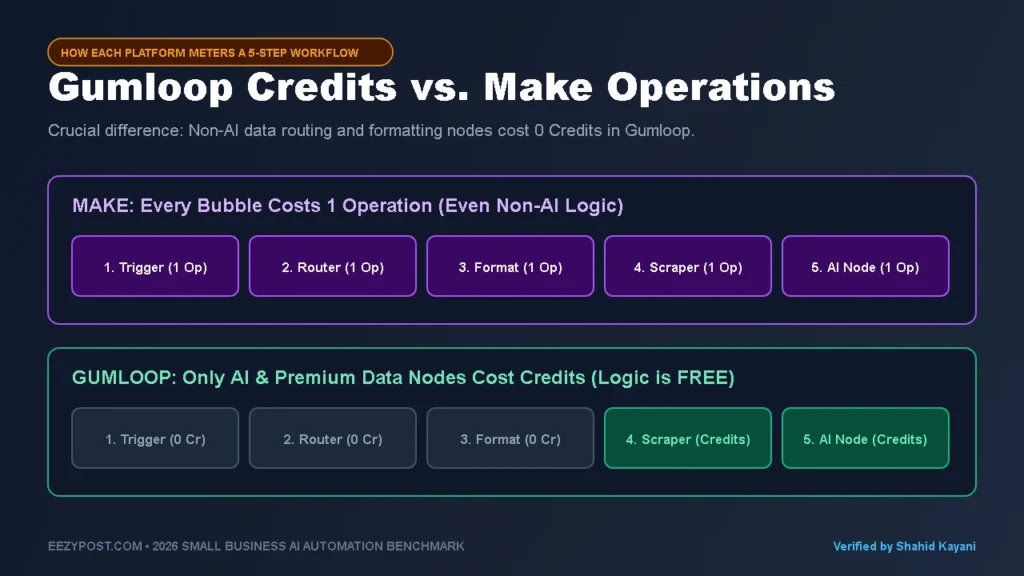
Before you compare monthly plans, you have to understand a massive difference in how Gumloop credits vs. Make operations are counted during a workflow run.
- In Make, every module costs 1 Operation (Credit): Whether a bubble on your canvas is calling GPT-4o, splitting data with a router, formatting a date, or checking an empty Gmail inbox on a timer, Make bills you 1 operation per module. A 12-step workflow with 10 formatting/routing steps and 2 AI steps burns 12 operations every run.
- In Gumloop, non-AI workflow steps are FREE: This is the part most review sites miss. In Gumloop, basic data-routing, formatting, logic branches, and standard workspace steps cost 0 credits. You could chain 25 data-cleaning and routing nodes together, and your credit balance barely flinches. Gumloop only deducts credits when you trigger compute-heavy actions: calling an LLM, scraping a live webpage, or pulling enriched data from premium integrations like Semrush or Apollo.
Real-World Stress Test: Automated Lead Research & AI Web Scraping
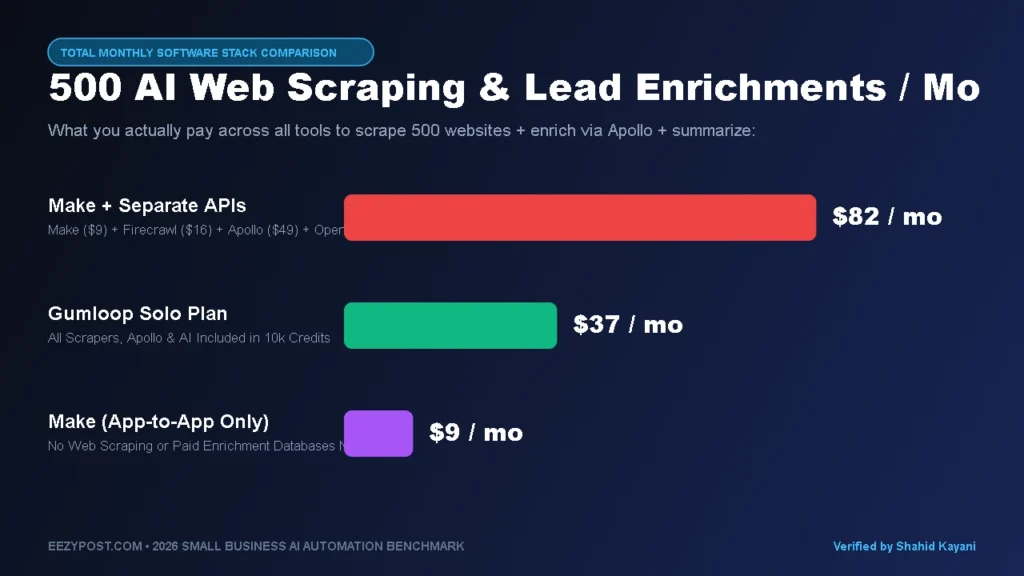
Let’s test both platforms on one of the most common workflows small businesses and agencies build: AI web scraping automation and lead enrichment.
Imagine you want to process 500 new B2B leads or competitor URLs per month:
- Step 1: New domain or company name lands in a Google Sheet.
- Step 2 (Web Scraping): Scrape the target company’s homepage and pricing page into clean Markdown (bypassing bot blockers).
- Step 3 (Lead Enrichment): Pull verified decision-maker info via Apollo or search data via Semrush/Exa.
- Step 4 (AI Analysis): Have Claude or GPT-4o analyze the scraped site and write a custom 3-bullet outreach hook.
- Step 5 ( Logic & CRM): Format the output, filter out bad fits, and push the result to Slack and HubSpot.
Gumloop Pricing vs. Make Table (500 Enriched AI Runs/Month)
| Cost & Feature Breakdown | Gumloop (Solo Plan) | Make (Core Plan + BYOK Stack) |
| Base Platform Subscription | $30 to $37 / mo (10,000+ Credits) | $9 to $10.59 / mo (10,000 Credits/Ops) |
| Non-AI Routing & Formatting Steps | Free (0 Credits) | 1 Credit per Module |
| Web Scraper (Firecrawl / Apify) | Included (Uses Gumloop Credits) | $16 to $29 / mo (Separate Subscription) |
| Lead / SEO Data (Apollo / Semrush) | Included (20+ Premium Tools Built In) | $49+ / mo (Separate Paid API Account) |
| LLM API Keys (OpenAI / Claude) | Included (Or BYOK to lower credit burn) | $5 to $15 / mo (Separate API Billing) |
| True All-In Monthly Bill | $30 to $37 / mo Total | $79 to $103+ / mo Across 4 Bills |
Look at the bottom line in that table. If you are only moving existing data between Google Sheets, Gmail, and Stripe, Make wins hands-down at $9 a month.
But the moment your workflow needs live web scraping, SEO data, or contact enrichment, Make’s cheap base price is an illusion—because Make forces you to pay separate monthly subscriptions for every data provider you plug into it.
Automating E-Commerce Creative Production? Many brands use Gumloop and Make to scrape customer reviews and auto-generate ad scripts—see how that pipeline feeds into AI generated video ads for ecommerce and why pairing AI VFX hooks with real product B-roll beats pure AI avatars on ROAS.
⚡ EEZYPOST Gumloop vs. Make Total Cost Calculator
Toggle what your workflow needs to compare true all-in monthly software bills:
Why Non-Coders Love Gumloop: Gummie AI & Built-In Scrapers

If you have ever tried to scrape a modern JavaScript website inside Make using a raw HTTP GET module and a Regex text parser, you know how painful it is. Half the time you get blocked by Cloudflare, and the other half you get a wall of raw HTML tags that blows up your OpenAI token limit.
Gumloop solves three huge headaches for non-technical founders:
- Native Web Scraping & PDF Reading: You drag a single Web Scraper node onto the canvas, drop in a URL, and Gumloop automatically renders the page and hands your AI node clean, readable text. It even includes a Chrome Extension that lets you record browser actions or trigger flows directly from the page you are viewing.
- Gummie AI Builds the Flow for You: Instead of hunting through documentation to figure out how to link nodes together, you tell Gummie (Gumloop’s built-in AI assistant) what you want in plain English, and it drafts the node graph on your canvas automatically.
- Gumstack & MCP Servers for Teams: If you are building AI agents that your team can chat with directly inside Slack or Microsoft Teams, Gumloop lets you deploy agents backed by 50+ MCP (Model Context Protocol) servers with SOC 2 Type II security and role-based access controls—something that takes hours of custom webhook engineering to replicate in Make.
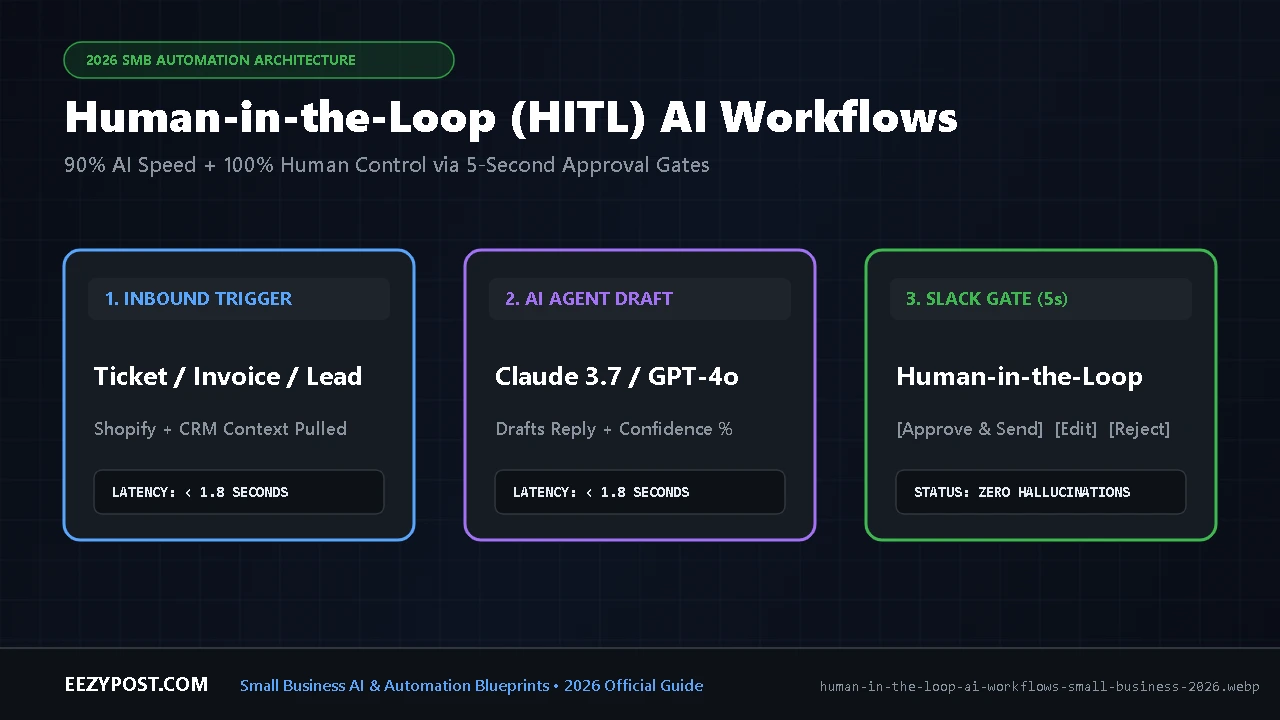
Need to pause your Make or Gumloop scenario for manager sign-off? See our complete technical guide on building human in the loop AI workflows with Slack approval gates using the zero-timeout Two-Scenario Webhook Pattern.
Where Make Still Crushes Gumloop (And Why 70% of Businesses Need It)
Does that mean you should cancel Make and move everything to Gumloop? Definitely not. In fact, for general business operations, Make still beats Gumloop in four major categories:
- 3,000+ App Integrations vs. ~100+: Gumloop connects well to Google Workspace, Slack, HubSpot, Salesforce, and BigQuery. But if your business relies on WooCommerce, Pipedrive, Xero, Kajabi, Monday.com, or Asana, Make has deep, verified native modules for all of them.
- Predictable Billing for Rule-Based Workflows: In Make, 1 module = 1 operation. You always know exactly what a run will cost. In Gumloop, complex AI reasoning or deep multi-page scraping can burn through credits much faster than you expect if you don’t use your own API keys (BYOK).
- Superior Error Handling & Visual Debugging: When an API fails at 2:00 AM, Make’s
Break,Resume, andRollbackerror handlers automatically catch the failed bundle, pause the queue, and let you replay the exact failed step the next morning. - Community & Templates: Make has been around for years (starting as Integromat), meaning every error message you could ever encounter already has ten YouTube tutorials and forum threads explaining how to fix it.
Pro Trick: How to Stretch Gumloop’s 10,000 Credits 3x Further (BYOK)

One complaint people have when testing Gumloop is that heavy Claude 3.7 Sonnet or GPT-4o prompts can chew through your 2,000 free onboarding credits (or your 10,000 Solo credits) faster than expected.
Here is how you fix that in 60 seconds: Turn on BYOK (Bring Your Own Key) for your LLM nodes.
While Gumloop lets you run AI models with zero setup using their built-in credits, they also let you paste your own OpenAI, Anthropic, or Gemini API key into the settings. When you plug in your own API key, Gumloop drastically reduces the platform credits charged per AI node, saving your valuable Gumloop credits strictly for their built-in web scrapers, Firecrawl nodes, and Apollo/Semrush lookups.
Quick Decision Matrix: Should You Pick Gumloop or Make?
- Choose Make ($9/mo) if: You need to connect 3+ everyday business apps (CRMs, payment processors, project management tools, email marketing), want predictable 1-to-1 operation billing, and don’t need built-in web scraping or lead enrichment databases.
- Choose Gumloop ($30–$37/mo) if: You want an AI workflow builder without API keys for scraping websites, extracting data from complex PDFs, enriching leads with built-in Apollo/Semrush data, or launching Slack-based AI agents without writing code.
- The Power-User Combo: Many agencies run Make as their central nervous system (for $9/mo) to catch webhooks from Stripe, Calendly, and HubSpot, and then trigger a Gumloop webhook specifically when a step requires heavy web scraping or multi-agent research.
Frequently Asked Questions (FAQ)
Is Gumloop cheaper than Make in 2026?
For standard app-to-app automation, no—Make starts at $9/month ($10.59 billed monthly) for 10,000 operations, whereas Gumloop’s Solo plan costs $30 to $37/month for 10,000+ credits. However, for AI research workflows, Gumloop is often cheaper overall because non-AI routing steps are free and its subscription includes access to 20+ paid data tools (like Firecrawl, Apollo, and Semrush) that would cost over $70/month to buy separately in Make.
Do non-AI steps use credits in Gumloop?
No. Unlike Make—which charges 1 operation credit for every single router, filter, or formatting module—Gumloop does not charge credits for standard non-AI workflow steps. You only consume credits when running AI models, web scrapers, or premium third-party data enrichments.
Can Gumloop replace Make completely?
Only if your tech stack revolves around Google Workspace, Slack, Notion, HubSpot, and AI research. Because Make offers over 3,000 native app integrations compared to Gumloop’s ~100+ core connectors, businesses that automate accounting, e-commerce inventory, or niche CRMs still need Make (or self-hosted n8n) for general back-office plumbing.





Leave a Reply