

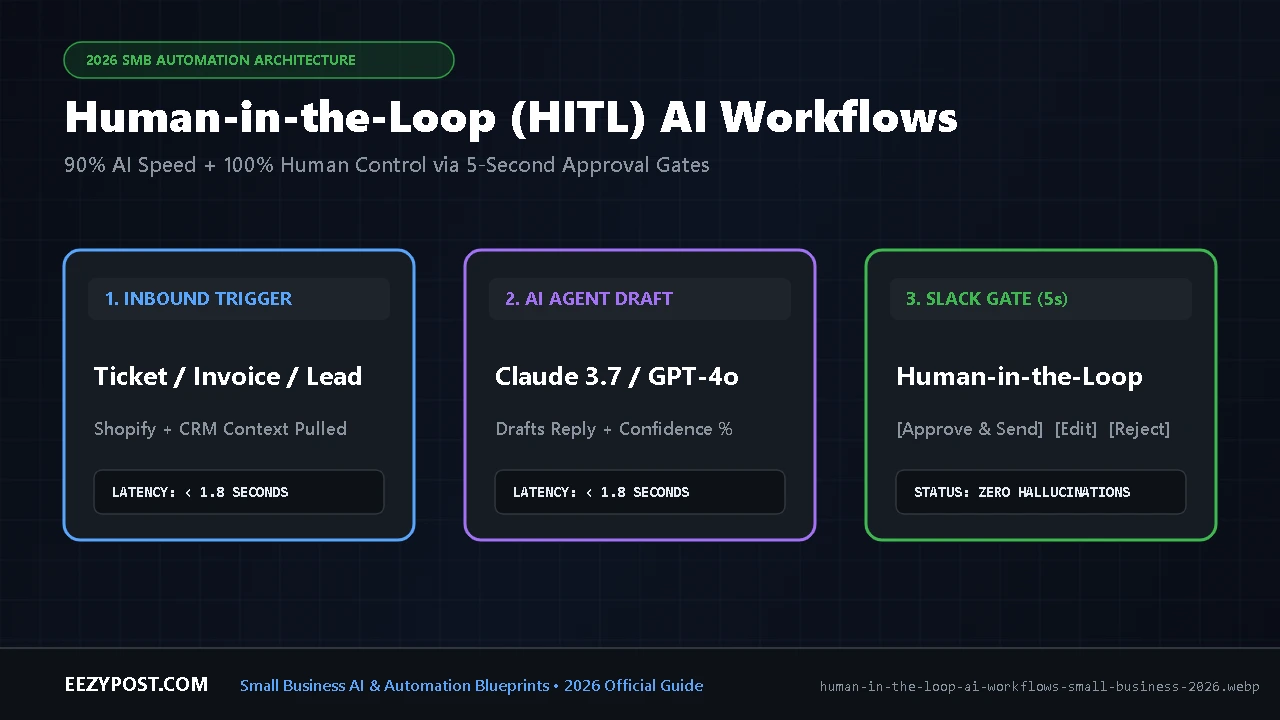
Human in the loop AI workflows are automated systems where an AI agent handles 90% of the heavy lifting—reading incoming emails, checking order databases, and drafting responses—before pausing at a mandatory checkpoint so a human can approve, edit, or reject the action with a single click. For a small business, this design pattern eliminates the biggest nightmare of modern automation: an unsupervised AI hallucinating a policy, issuing an unauthorized refund, or torching a high-value client relationship.
When I first started wiring up AI tools for small business, I made the rookie mistake almost every founder makes. I connected an LLM directly to an inbox trigger and set it to auto-reply. It worked great for forty-eight hours—until a frustrated customer asked for a custom billing exception, and the AI cheerfully promised them a 50% lifetime discount that didn’t exist.
That single misfire taught me a rule I now build into every system: Never let a probabilistic AI model execute an irreversible business action without a deterministic human gate.
Here is the exact blueprint for building AI approval workflows for small business operations—covering customer support triage, invoice verification, and outbound client quotes—so you can cut manual busywork by 85% without losing sleep.
What Are Human in the Loop AI Workflows? (And Why Full Autonomy Fails SMBs)
In enterprise data science, “human-in-the-loop” used to mean armies of contractors labeling training images. In 2026 small business operations, it means something completely different: strategic pause-and-resume architecture.
When you deploy the best AI agents in 2026, those agents operate on probabilities, not rigid if/then code. Even a model with 98% accuracy will fail 2 times out of 100. If you are a giant telecom company, a 2% error rate is a rounding error. If you are a 5-person agency or an e-commerce brand processing 50 tickets a day, one bad hallucination per day will destroy your reputation in a month.
A properly engineered human in the loop AI workflow splits every business process into three phases:
- Context Gathering & Drafting (100% AI): The workflow triggers on a new email, form submission, or Stripe event, pulls customer history from your CRM, cross-references your SOPs, and drafts the exact action or reply.
- The Approval Gate (5-Second Human Check): Instead of firing the email or executing the API call, the automation pauses state and sends a structured payload to Slack, Microsoft Teams, or a dedicated approval queue with
[Approve & Send],[Edit Draft], and[Reject]buttons. - Execution & Feedback Loop (100% Automated): Once you tap
[Approve]on your phone, a webhook catches your payload, resumes the paused scenario, sends the message, and logs the approved output as a gold-standard example for future prompts.
Human in the Loop vs Human on the Loop AI: Which Model Do You Need?
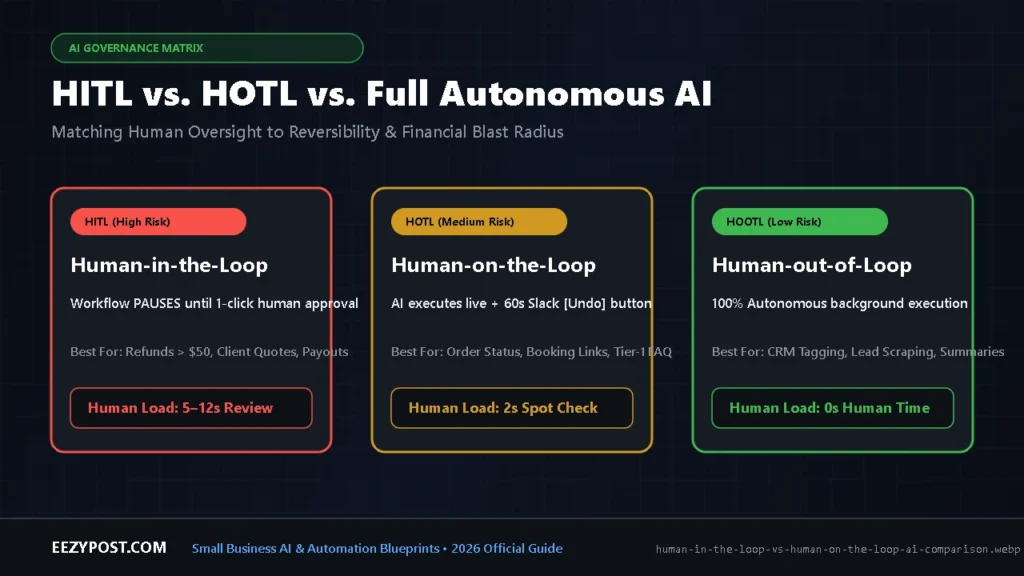
To build an AI approval workflow small business teams won’t hate using, you can’t put a human roadblock in front of every trivial task. If you force a manager to approve internal CRM tag updates, your team will suffer from approval fatigue and start blindly clicking “Yes” without reading.
Instead, we divide every automation into three governance tiers based on reversibility and blast radius—aligning with the human oversight principles outlined in the NIST AI Risk Management Framework.
| Oversight Model | How It Works in Practice | Best Small Business Use Cases | Blast Radius if AI Fails | Average Human Time per Task |
| Human-in-the-Loop (HITL) | Workflow pauses completely until a human clicks Approve, Edit, or Reject. | Refunds over $50, client proposal emails, invoice payouts, contract edits. | High / Irreversible (Financial loss or client churn). | 5 to 15 seconds (scanning side-by-side context). |
| Human-on-the-Loop (HOTL) | AI executes immediately, but streams a live log to a Slack channel with a 60-second [Undo / Override] button. | Standard order-status replies, appointment scheduling, FAQ ticket routing. | Medium / Reversible (Can send a quick follow-up correction). | 1 to 2 seconds (spot-checking the live feed). |
| Human-out-of-the-Loop (HOOTL) | 100% autonomous background execution with weekly summary digests. | Lead data enrichment, internal Slack summaries, receipt OCR categorization. | Low / Internal Only (Zero customer visibility). | 0 seconds per task. |
The 4-Point Litmus Test: When to Force a Human Approval Gate
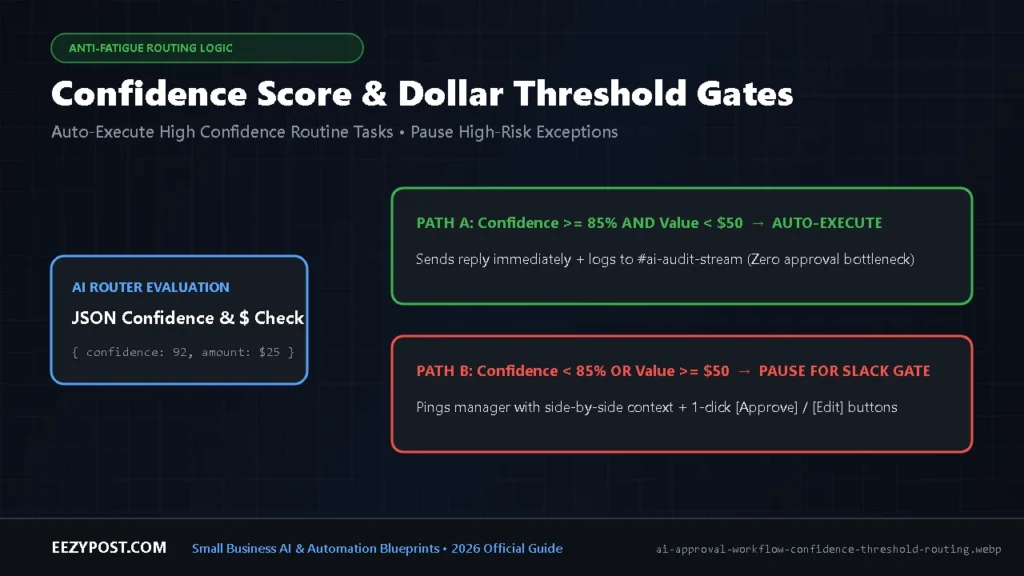
Before we wire up a workflow inside Make or Gumloop, we run every action step through a strict four-question checklist. Keep a human in the loop until all four conditions are met:
- Is the action irreversible? If an AI misclassifies a support ticket internally, you can re-tag it in two seconds. If an AI issues a Stripe refund or emails a legally binding quote to a prospect, you cannot un-ring that bell.
- Does the financial exposure exceed your threshold? Set hard dollar guardrails in your router logic. For example, let the AI auto-process return labels for orders under $35, but force a Slack human in the loop automation gate for any claim above $35.
- Is the AI’s confidence score below 85%? Force your LLM prompt to output a structured JSON object containing both
draft_responseandconfidence_score(from 1 to 100) based on whether the exact answer existed in your documentation. Route any score under 85 straight to human review. - Have you logged at least 200 error-free runs? Never launch a new workflow in autonomous mode on Day 1. Run it in strict HITL mode for the first 200 executions. Only graduate it to Human-on-the-Loop after proving the prompt doesn’t drift.
AI Approval Workflow Risk & ROI Calculator
Calculate your monthly hours saved, error risk exposure, and exact governance mode (HITL vs. HOTL vs. Full Auto) based on your workflow volume and blast radius.
Recommended Setup: Pause execution before sending. Route AI draft + confidence score to a Slack approval channel with [Approve & Send] and [Edit] buttons. Total net benefit: $2,517/month in combined labor savings and prevented errors.
3 Copy-Paste Human-in-the-Loop Blueprints for Small Business

Blueprint 1: Automate Customer Support with Human Approval (Zendesk / Gmail + Slack)
Most founders want to automate customer support with human approval because writing replies from scratch eats three hours a day, yet canned templates feel robotic.
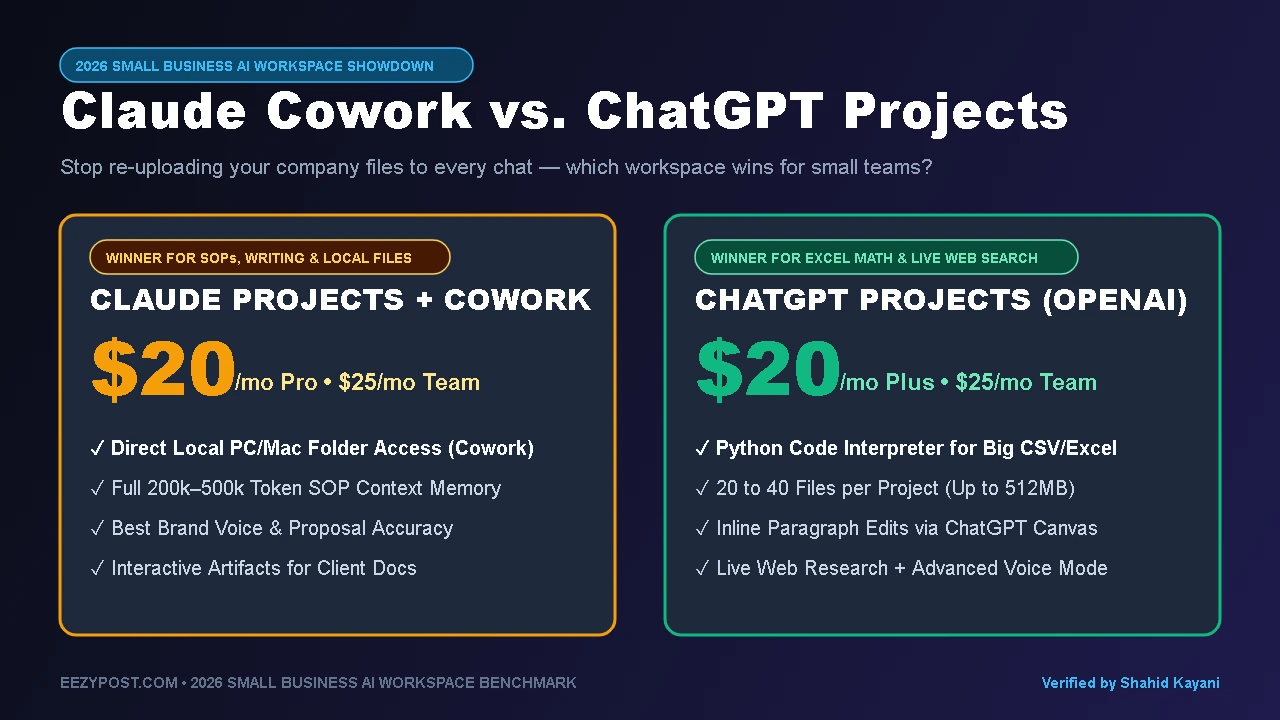
- Step 1 (Trigger & Context): A new support email arrives in Gmail or Help Scout. Your automation pulls the customer’s last 3 orders from Shopify/Stripe and fetches your return policy SOP—which we recommend storing inside a structured workspace (see our breakdown of Claude Cowork vs. ChatGPT Projects for small business for how to organize clean AI knowledge bases).
- Step 2 (Structured LLM Evaluation): Claude 3.7 Sonnet or GPT-4o reads the ticket and outputs JSON:
summary: 1-sentence issue breakdown.sentiment: Angry / Neutral / Happy.policy_match: True / False.draft_reply: The ready-to-send email.
- Step 3 (The Slack Interactive Gate): The workflow posts a Slack Block Kit message to
#support-approvalsshowing the customer’s question on top, the AI’s proposed reply below, and three buttons: [Approve & Send], [Approve + 10% Credit], or [Open in Gmail Drafts]. - Step 4 (Webhook Resume): Clicking [Approve & Send] fires a webhook back to your automation platform, which immediately sends the reply and closes the ticket. Total human effort: 4 seconds.
Blueprint 2: AI Client Proposal & Outbound Quote Gate
When a high-intent lead fills out your agency or service inquiry form, speed-to-lead wins the deal—but sending an unvetted AI scope of work is reckless.
- The Flow: The form submission triggers an enrichment lookup, calculates an estimated project price based on your rate card, and generates a personalized 3-paragraph reply with a calendar link.
- The Gate: Instead of emailing the prospect, the system sends you a push notification on Slack or Telegram with the lead’s LinkedIn profile, budget tier, and proposed email text. You tap [Send Now] while walking to grab coffee, and the prospect gets a tailored, human-verified response within 3 minutes of submitting your form.
Applying Human-in-the-Loop to Paid Media & Creative Testing: Just like unsupervised support agents can hallucinate refunds, pure AI video avatars suffer from 35% faster ad fatigue and checkout trust drop-offs. Review our 2026 AI video ads CPA benchmark to see where to keep human proof in your creative pipeline while automating hook testing.
Blueprint 3: Accounts Payable & Invoice Anomaly Verification
- The Flow: An OCR + LLM node extracts line items, vendor names, and totals from PDF invoices landing in
billing@yourcompany.com. - The Gate: If the invoice matches an existing purchase order within a 2% variance, it auto-syncs to QuickBooks/Xero as a draft bill. If the total jumps by more than $100 compared to last month’s recurring charge, the workflow pauses and pings the founder in Slack with a red warning flag: “Vendor X invoice is 18% higher than 90-day average. Approve scheduling payment?”
How to Wire Up Slack Approval Gates (Gumloop vs. Make vs. Zapier)
Choosing the right orchestration engine determines how painful it is to manage paused states. When a workflow waits four hours for a human to click a button, the platform has to hold that execution data in memory without timing out or burning through your monthly budget. (If you want a deep dive into how execution billing works under the hood, check our full guide on Gumloop vs. Make AI workflows and pricing).
| Platform | Native HITL / Approval Feature | How State Pause Works | Best For | Cost Impact of Waiting |
| Gumloop | Native Browser Handoff & Approval Nodes | Built-in HITL pauses workflow execution cleanly and hands off live context or waits for human input before resuming downstream nodes. | AI-native multi-step agents & web scraping approvals. | Low (pausing doesn’t burn extra AI reasoning credits). |
| Make.com | Two-Scenario Webhook Split ( + Slack Block Kit) | Scenario A saves the AI draft to Airtable/Data Store and sends Slack buttons. Scenario B triggers only when the Slack button webhook fires. | High-volume SMBs wanting rock-bottom cost per execution. | 2 Operations per approval (1 to send, 1 to catch webhook). |
| Zapier | Zapier Human in the Loop / Interfaces | Native “Collect Information” and approval pause actions inside Zaps and Zapier Central agents. | Teams wanting a 10-minute setup with zero custom JSON. | Higher monthly base cost, predictable task billing. |
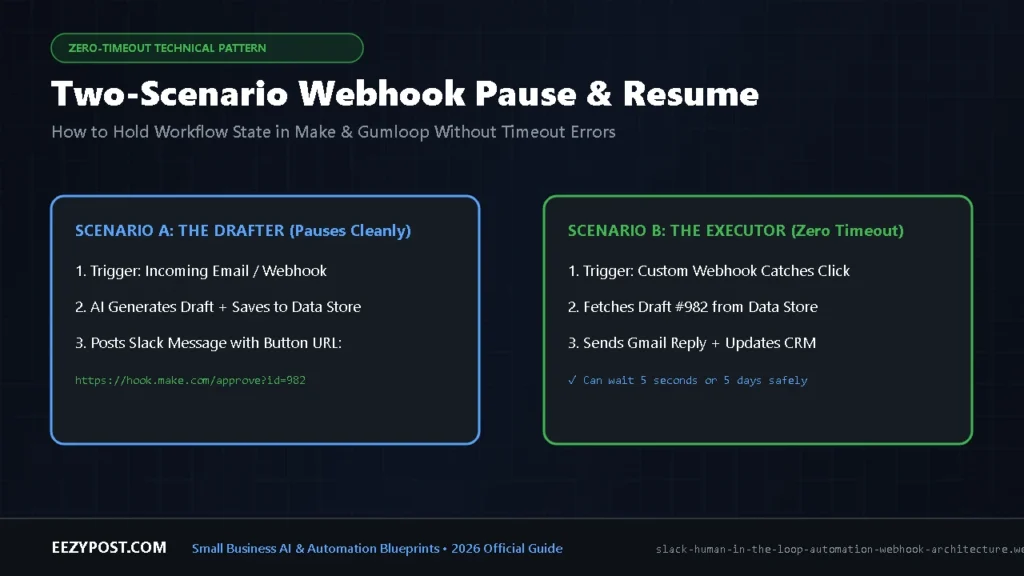
Pro Tip: The “Two-Scenario Webhook Pattern” (Zero Timeout Risk)
If you build your Slack human in the loop automation inside Make.com, never use a “Sleep” module to wait for a human response—Make scenarios time out after 40 minutes. Instead, use the Two-Scenario Pattern:
- Scenario 1 (The Drafter): Triggers on the incoming email $\rightarrow$ generates the AI response $\rightarrow$ saves the
Thread_IDandDraft_Textas a row in a free Make Data Store (or Airtable) $\rightarrow$ sends a Slack message containing a button linked to a Custom Webhook URL ([https://hook.make.com/your-webhook?record_id=123&action=approve](https://hook.make.com/your-webhook?record_id=123&action=approve)). - Scenario 2 (The Executor): Starts with that exact Custom Webhook $\rightarrow$ looks up
record_id=123from the Data Store $\rightarrow$ sends the email via Gmail $\rightarrow$ updates the Slack message to read “✅ Approved & Sent by @Founder at 2:14 PM.”
This architecture can wait 5 seconds or 5 days without ever timing out or losing context.
Frequently Asked Questions (AEO Quick Answers)
What is an example of a human in the loop AI workflow for a small business?
The most profitable example is an AI customer support triage gate. When a customer emails asking for an order update or refund, an AI agent pulls their Shopify order status, reads your company return policy, and writes a complete reply. Instead of sending it directly to the customer, the workflow posts the draft into a private Slack channel with an [Approve & Send] button so the business owner can verify it in five seconds.
How do you prevent approval fatigue in human-in-the-loop automation?
You prevent approval fatigue by implementing confidence-threshold and dollar-value routing. Only route tasks to a human when the AI’s confidence score drops below 85% or the financial impact exceeds a fixed limit (such as a refund over $50). Additionally, always display the customer’s original message and the AI’s proposed action side-by-side in Slack so the reviewer never has to open another tab to verify facts.
Does adding a human in the loop slow down automation ROI?
No. Writing a customer email or researching an invoice from scratch takes an average of 6 to 8 minutes. Reviewing a pre-researched, pre-drafted AI output and clicking an approval button takes 8 to 12 seconds—delivering a 95% reduction in labor time while reducing costly AI hallucination mistakes to near zero.





Leave a Reply