

If you run a small business, you already know the most annoying part of using AI every day: context amnesia. You open a fresh chat window to write a client proposal or answer a billing question, and you spend the first ten minutes hunting through Google Drive to re-upload your pricing PDF, your brand voice doc, and three past examples so the AI doesn’t sound like a robot.
That exact frustration is why Claude Cowork vs. ChatGPT Projects has become the most important workflow debate for small teams in 2026.
Instead of treating AI like a goldfish that forgets who you are every time you click “New Chat,” both Anthropic and OpenAI now give you persistent workspaces where your company SOPs, spreadsheets, and local folders live permanently. After testing automation pipelines in our Zapier vs. Make vs. n8n pricing comparison and our Gumloop vs. Make AI workflow test, we put Anthropic’s workspace ecosystem (Claude Projects + Claude Cowork desktop folder access) head-to-head against ChatGPT Projects to see which one actually saves more hours inside our Best AI Tools for Small Business in 2026 stack.
First, Let’s Clear Up the Naming Confusion: Cloud Projects vs. Desktop Cowork
Before comparing features, we need to separate two things people constantly mix up when searching for Claude Projects vs. ChatGPT Projects:
- Cloud Workspace Containers (Claude Projects & ChatGPT Projects): Both tools let you create dedicated folders in the cloud—like “Q4 Marketing,” “Client Onboarding,” or “Legal & HR SOPs.” You upload your reference documents once, write a master instruction prompt for that folder, and every new chat inside that folder automatically knows all your uploaded files.
- Local Desktop Folder Access (Claude Cowork / Desktop Agent Mode): This is Anthropic’s secret weapon for non-coders. Instead of manually uploading files to the cloud every time you edit a spreadsheet or Word doc, Claude Cowork (built into the Claude Desktop app) lets you point Claude directly at a real folder sitting on your Mac or Windows computer. Claude can read, organize, summarize, and draft new files directly inside your local folder without you dragging and dropping a single attachment.
Claude Projects vs. ChatGPT Projects: The Architecture & File Limit Showdown

Even when you compare cloud-to-cloud folders, OpenAI and Anthropic process your uploaded business documents using completely different mechanics. That difference explains why one tool nails your brand voice on the first try while the other sometimes misses a detail buried on page 14 of a PDF.
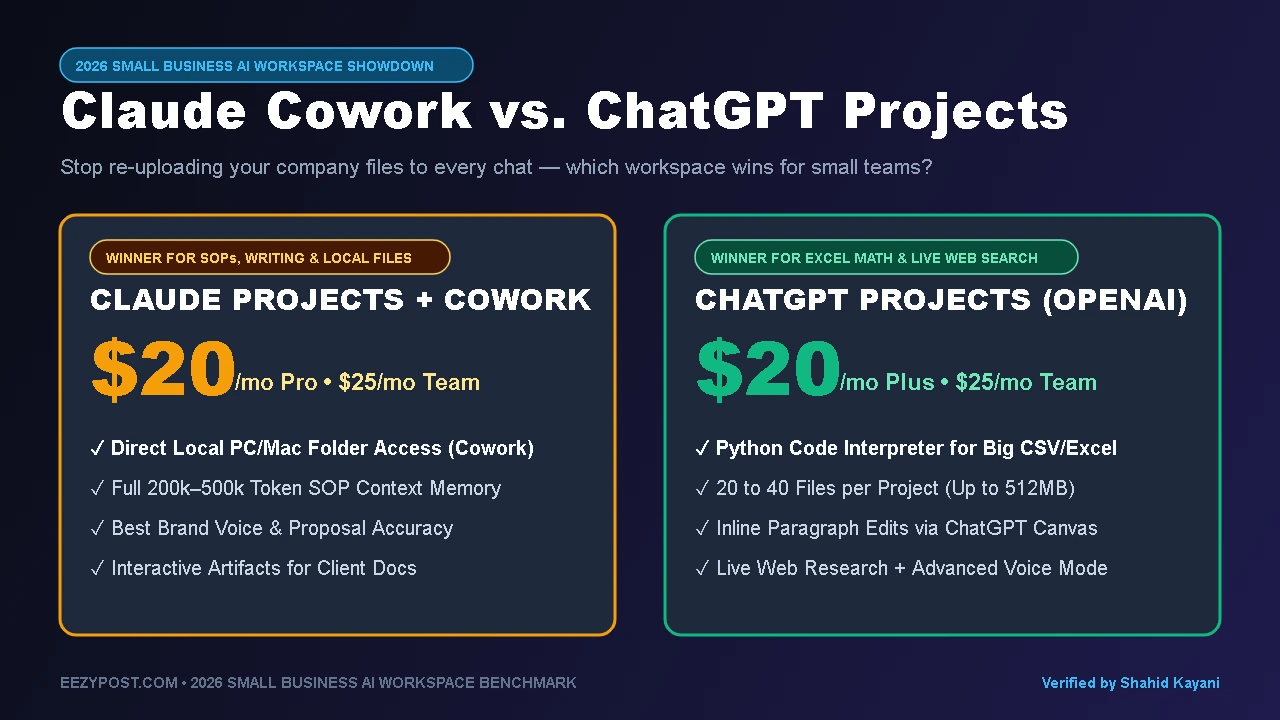
How Claude Projects reads your files (Full-Context Injection): When you upload company SOPs into a Claude Project, Anthropic loads the full text of those documents directly into its massive 200,000-to-500,000-token context window alongside prompt caching. Because Claude sees the entire document library at once rather than skimming snippets, it is uncannily good at connecting dots across ten different SOP files and matching your exact writing style.
How ChatGPT Projects reads your files (Vector Search + Python Code Interpreter): ChatGPT Projects lets you group chats, custom instructions, and uploaded files (typically 20 to 40 files per project on Plus and Pro/Team tiers). When you ask a question, ChatGPT often uses retrieval search to pull relevant chunks from your files. Where ChatGPT wins is live math, web search, and Python data analysis—if your folder contains five messy CSV sales reports, ChatGPT spins up a Python environment in the background to calculate exact totals and build charts without hallucinating the math.
Claude Cowork vs. ChatGPT Projects Comparison Table (2026)
| Workspace Feature | Claude Projects + Claude Cowork | ChatGPT Projects (Plus / Team) |
| Individual / Team Pricing | $20/mo (Pro) or $25–$30/user (Team) | $20/mo (Plus) or $25–$30/user (Team) |
| Local Computer Folder Access | Yes (Native via Claude Cowork / Desktop MCP) | Limited (Requires manual upload or app connector) |
| How It Reads Uploaded SOPs | Full 200k–500k Token Context Window | Retrieval Search + Python Code Interpreter |
| File Upload Capacity | Up to ~30MB per file (500+ pages of text per project) | 20 to 40 files per Project (Up to 512MB per file) |
| Side-by-Side Document Editor | Claude Artifacts (Live docs, HTML tools, flowcharts) | ChatGPT Canvas (Inline paragraph editing & comments) |
| Deep Research & Live Web Access | Included, but best at deep document synthesis | Stronger live web search + multi-model switching |
| Best Use Case for Small Business | SOP management, client deliverables, brand writing & local file cleanup | CSV/Excel financial analysis, live market research & coding |
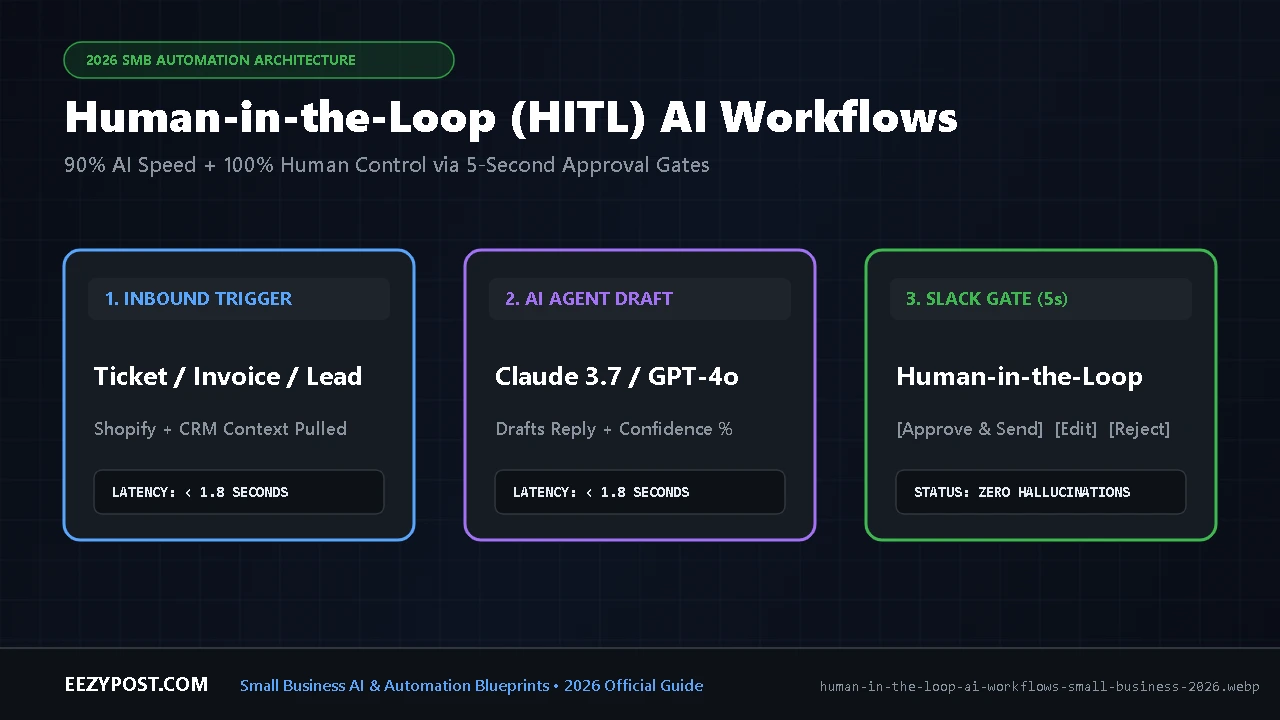
Want to connect your stored SOPs directly to Gmail, Shopify, and Slack? Once your knowledge base is organized, follow our blueprint on human in the loop AI workflows for small business to let AI draft customer replies automatically while keeping a 5-second human approval gate before anything is sent.
Using Claude Cowork or ChatGPT Projects to script video ads? Once you load 50 customer reviews into your workspace to generate scroll-stopping 3-second hooks, plug those scripts directly into our hybrid AI UGC ad workflow to test 20 video ad variations in 48 hours without paying creator buyout fees.
⚡ EEZYPOST AI Workspace & SOP Calculator
Select your team size and primary bottleneck to compare workspace fit and generate your custom folder prompt:
How to Organize Company SOPs With Claude (The 4-Folder Small Business Blueprint)
The biggest mistake I see founders make when setting up the best AI workspace for small business is dumping 40 unrelated documents into one giant “My Business” project. Within a week, your sales scripts are bleeding into your accounting prompts, and you hit context limits twice as fast.
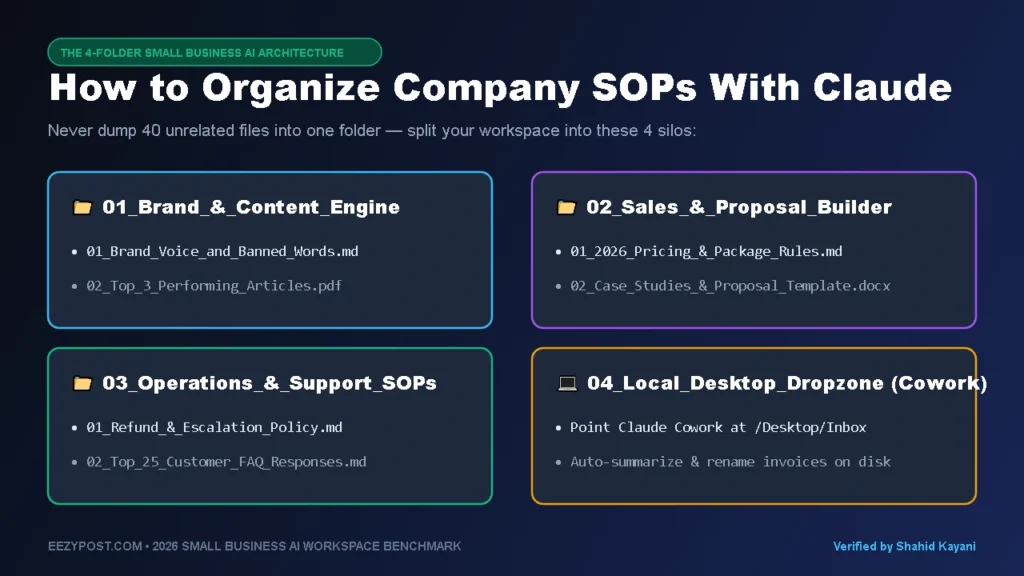
If you are wondering how to organize company SOPs with Claude or ChatGPT Projects so your team actually uses them, split your business into four specific folders using this exact file naming structure:
Folder 1: 01_Brand_&_Content_Engine
- Files to upload (4–6 docs max):
01_Brand_Voice_and_Banned_Words.md(List the exact phrases you hate—like “In today’s fast-paced digital landscape”—so the AI never uses them).02_Top_3_Performing_Articles_or_Emails.pdf(Real samples of your best writing).03_Target_Customer_Pain_Points.md(Who buys from you and what objections they raise).
- Why it works: Every blog post, newsletter, or social script drafted inside this folder immediately sounds like you wrote it yourself.
Folder 2: 02_Sales_&_Proposal_Builder
- Files to upload:
01_2026_Service_Packages_and_Pricing_Rules.md02_Case_Studies_and_Client_Results.pdf03_Winning_Proposal_Template.docx
- Why it works: Paste a raw transcript from a 20-minute discovery call into this folder, and the workspace generates a scoped, accurately priced client proposal in 30 seconds.
Folder 3: 03_Operations_&_Customer_Support_SOPs
- Files to upload:
01_Refund_and_Escalation_Policy.md02_Top_25_Customer_FAQ_Responses.md03_Onboarding_Checklist_SOP.md
- Why it works: When a new virtual assistant or support rep joins your team, they don’t have to slack you every ten minutes asking “How do we handle a late invoice?” They just ask Folder 3.
Folder 4: 04_Local_Desktop_Dropzone (For Claude Cowork)
- How to set it up: Create a folder on your desktop called
Claude_Cowork_Inbox. Drop raw invoices, messy CSV exports, or contract PDFs in there and let Claude Cowork rename, summarize, and extract action items directly on your hard drive.
3 Copy-Paste AI Desktop Folder Workflow Prompts

Whether you use ChatGPT Projects, Anthropic’s official Claude Projects, or Claude Cowork on your desktop, a workspace is only as good as its Custom Instructions. Copy and paste these AI desktop folder workflow prompts directly into your Project Instructions box:
Prompt 1: The Master SOP Enforcer (Paste into Your Operations Project)
You are the Operations Manager for our business. Before answering any question, ALWAYS check the uploaded SOP documents in this Project first.
Rules:
- Quote the exact SOP filename and section when giving instructions.
- If an answer is NOT explicitly covered in our uploaded SOPs, do not guess—say “SOP GAP DETECTED” and draft a 3-bullet rule we should add to our documentation.
- Keep all internal responses under 150 words using numbered action steps.
Prompt 2: The Local Folder Triage Prompt (For Claude Cowork Desktop)
Scan all new files inside my local /Claude_Cowork_Inbox folder. For every PDF or document found:
- Read the contents and create a single master table named _Monthly_Summary.md inside the folder listing: Original Filename | Vendor/Client Name | Date | Dollar Amount | 1-Sentence Action Needed.
- Suggest a clean, standardized filename using the format YYYY-MM-DD_ClientName_DocType.pdf before renaming anything.
Prompt 3: The Discovery Call-to-Proposal Generator (Paste into Your Sales Project)
You are our Senior Solutions Architect. Whenever I paste a raw call transcript or client email into this chat:
- Match their stated problem against our uploaded 01_2026_Service_Packages_and_Pricing_Rules.md file.
- Pull the single most relevant proof point from 02_Case_Studies_and_Client_Results.pdf.
- Draft a ready-to-send proposal following the exact structure of 03_Winning_Proposal_Template.docx without inventing discounts or custom deliverables.
Where ChatGPT Projects Still Wins Over Claude
As much as I prefer Claude for writing, SOP retrieval, and local folder work via Claude Cowork, there are three situations where ChatGPT Projects is still the better tool on your desk:
- Heavy Excel & CSV Crunching: If you upload four 15,000-row spreadsheets from Shopify or Stripe and ask for cohort retention tables, ChatGPT’s Python Code Interpreter writes and runs real Python code on your files. Claude has improved at analysis, but ChatGPT is still tougher to beat on raw spreadsheet math.
- Inline Editing With ChatGPT Canvas: When you are polishing a single sales letter paragraph by paragraph, ChatGPT Canvas lets you highlight three sentences and say “Make just this section punchier” without regenerating the entire 1,500-word document.
- Voice Mode & Mobile On-the-Go: If you like pacing around your office talking through a project out loud on your phone, ChatGPT’s Advanced Voice Mode inside a Project still feels faster and more natural than any competitor.
Quick Decision Guide: Which AI Workspace Should You Pick?
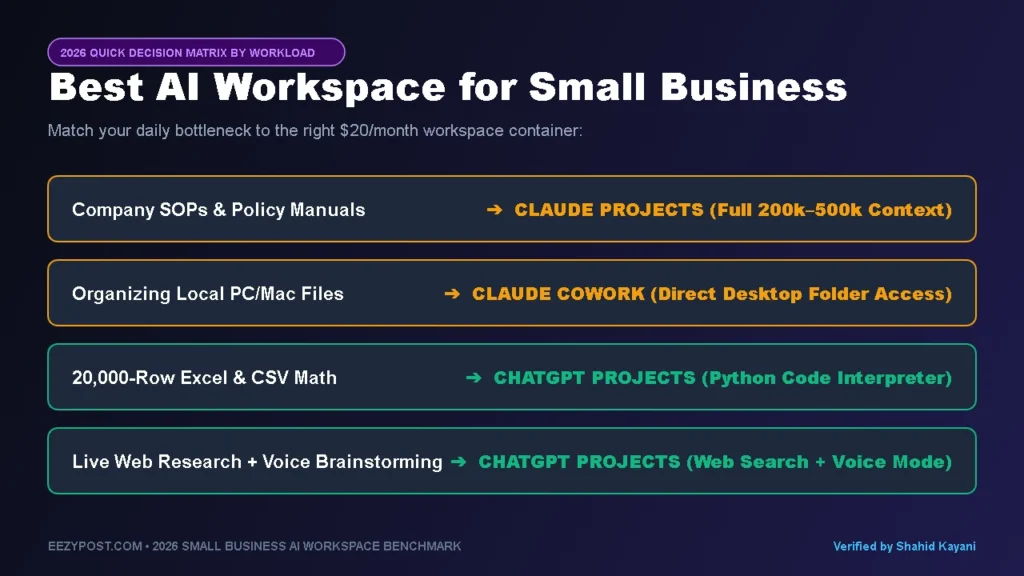
- Choose Claude Projects + Claude Cowork ($20/mo) if: Your daily bottlenecks are writing in your exact brand voice, turning messy SOPs into a searchable company brain, building interactive client Artifacts, or letting an AI agent organize files directly inside a local folder on your computer.
- Choose ChatGPT Projects ($20/mo) if: Your workflows revolve around analyzing large Excel/CSV files with Python, combining uploaded PDFs with live Google-style web research, or using inline Canvas edits and Voice Mode.
- When You Graduate From Folders to Full Automation: Workspace folders still require a human to type a prompt. Once a workflow becomes 100% repetitive—like triaging every incoming support ticket automatically—connect your AI to our Best AI Agents in 2026 using Make, Gumloop, or n8n.
Frequently Asked Questions (FAQ)
What is the difference between Claude Projects and Claude Cowork?
Claude Projects is a cloud-based workspace inside Claude where you upload reference documents and set custom instructions that persist across all chats in that folder. Claude Cowork (powered by the Claude Desktop app and Model Context Protocol) connects Claude directly to local folders and applications on your computer so it can read, summarize, and create files on your hard drive without manual cloud uploads.
How many files can you upload to ChatGPT Projects vs. Claude Projects in 2026?
ChatGPT Projects allows 20 to 40 uploaded files per project (up to 512MB per file) depending on whether you are on the Plus, Pro, or Team plan. Claude Projects measures capacity by total text context—allowing you to upload dozens of documents (up to 30MB each) that fit inside its 200,000-to-500,000-token context window, roughly equivalent to a 500-page book per project.
Is Claude or ChatGPT better for company SOPs?
Claude is generally better for written company SOPs, brand guidelines, and policy manuals because it loads the full text of your documents into its context window rather than relying solely on chunked vector search. ChatGPT Projects is better when your SOPs rely on massive Excel spreadsheets or live web lookups that require Python Code Interpreter execution.




Leave a Reply